Download Free ProtaStructure Suite 2026 - Structural Engineer
Concept about the ProtaStructure 2026 software
The ProtaStructure 2026 is one of the innovative structural BIM solutions, which enables the structural engineers to design and analyse buildings quickly and accurately. The advanced integrated features of the ProtaStructure 2026 software help to generate quick and accurate design outputs.
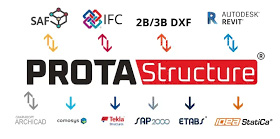
With the help of the ProtaStructure 2026, the design changes can be handled with ease, thus can coordinate the design projects with owners, architects and other stakeholders along with intelligent BIM integration. The ProtaStructure 2026 software helps to produce high-quality drawings within a few times, thus enhancing the overall design project profits.
Discuss the key design features of the ProtaStructure 2026 software
Nonlinear analysis feature
The ProtaStructure 2026 software can integrate seamlessly with OpenSees, which enables users to transfer analytical design models via TCL files. This software can calculate nonlinear material properties automatically, which helps to make the design structure ready for performance analysis. This nonlinear analysis feature helps to save time and also helps to improve the design accuracy.
Fiber analysis feature
With the help of the ProtaStructure 2026 software, engineers are able to model and analyse the column, wall sections and beams by using the fiber elements. The users are allowed to define confined and unconfined concrete regions; they can create detailed fiber meshes around rebars to get more accurate design outputs.
Improving the steel modelling process
The steel modelling feature of the ProtaStructure 2026 software helps to provide more flexible steel shear modelling and better purlin placement options. This software also introduces new macros and detailed design reports, which help to simplify the steel design.
Faster analysis feature with 64-bit support
The ProtaStructure 2026 software uses a 64-bit architecture, which helps to improve design performance and helps to handle larger models efficiently. The 64-bit analysis process of the ProtaStructure 2026 software helps to deliver faster animations and diagrams, which helps to provide a smoother design workflow.
New member design diagram feature
The member design diagram of the ProtaStructure 2026 software has been redeveloped by using the latest technology and provides a user-friendly interface. These design diagrams can be customisable and provide superior stationing for design.
Able to use crack sections
This feature of the ProtaStructure 2026 software is important for the advanced seismic analysis requirements, as well as wind load or temperature loading, which require the assumption of cracked section properties.
Material and section effective stiffness factor
The material and section effective stiffness feature helps to cover different section modifiers for different members in different degrees of freedom. This feature helps to allow the user more refined control over the effective stiffness, including new settings for basement walls and coupling beams.
The section manager interface and improved steel database
The section manager has been improved, which helps to make the selection of the members, along with different materials and shapes, easier. The steel database includes many country-specific sections, which also improve the design process.
Improved visual interrogation
The visual interrogation feature of the ProtaStructure 2026 software includes the steel design status and steel utilisation ratios, which help to provide a quick review of the design efficiency.
Improved Revit integration
The ProtaStructure 2026 software helps to support bi-directional links with the latest Revit software versions, which helps to improve the project coordination and design workflow. This Revit integration feature helps to synchronise and track the model changes.
Automatic wind load calculator
The new wind load calculator of the ProtaStructure 2026 software can determine the wind forces automatically in accordance with the chosen wind code and apply them to the building structure. This wind load calculator helps to increase productivity, as the values need to be manually calculated and entered.
How to download the ProtaStructure 2026 software?
To download the ProtaStructure 2026 software, several steps need to be followed, which are:
1. At first, the users have to visit the Prota software download page or the authorised support portals to secure the specific setup file for the ProtaStructure 2026 software.
To get online demonstration, watch the following video tutorial.
Video Source: Ekidel
2. It needs to be ensured that the system has the appropriate .NET Framework components installed before starting the installation process.
Download ProtaStructure 2026
3. In the next step, the user has to right-click on the installation package and has to select "Run as administrator", which helps to prevent any kind of installation issues.
4. After that, the user has to follow the on-screen prompts, has to accept the license agreement, and also needs to select the installation folder.
5. In the next step, the user has to run the software and has to enter their credentials/license code when prompted, as the ProtaStructure 2026 software uses a cloud-based licensing system.
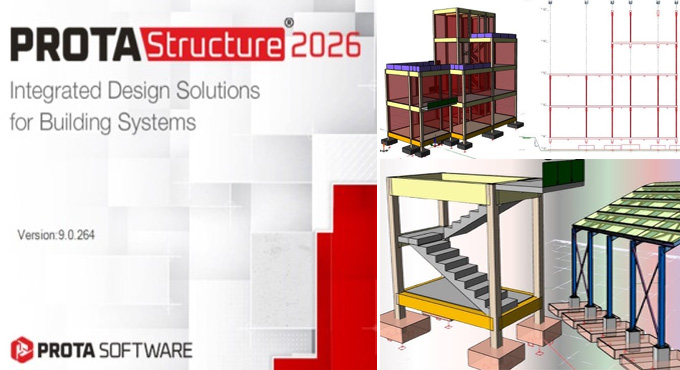
Gallery
Feel free to contact us for BIM requirements. One of our representative will respond you within 24 Hours. Send us your projects requirement today and grow your project.
Explore More !