Download NanoCAD 5.0 – Reliable 2D CAD Software
The nanoCAD 5.0 is one of the easiest-to-use free AutoCAD software, which helps to deliver a great user experience by providing a classic user interface and native .dwg support. The nanoCAD 5.0 software has been built to deliver the design and project documentation regardless of the design industry. This AutoCAD software has been designed to help the enterprise to experience a seamless transition to a cost-effective design model.
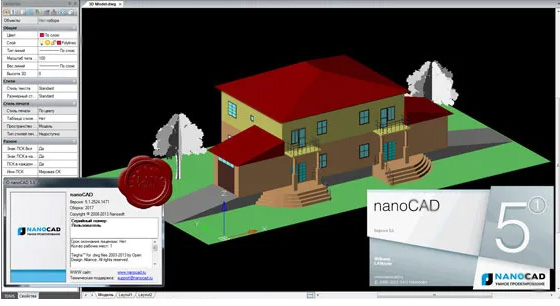
Discuss the design features of the nanoCAD 5.0 software
Having a classic and intuitive user interface
The nanoCAD 5.0 software offers an easy-to-use and intuitive user interface, in which every aspect is in its right place. As a result, menu, button icons, command line, panels and commands are easily recognisable by the users. This feature makes this software easy to migrate to since the enterprise needs no time to retrain its engineers.
Native DWG feature
The project created by the nanoCAD 5.0 software has been saved as a *.dwg file format, which could be easily opened and edited in the AutoCAD application that supports *.dwg files.
Offering a fundamental tool set
The nanoCAD 5.0 software offers all necessary design tools to create and edit 2D or 3D design objects, tables or texts. The reusable blocks offered by the nanoCAD 5.0 software help to simplify and speed up the drawing process. The advanced dimensioning features of the nanoCAD 5.0 software enable users to create any kind of dimensions by several means.
Offering more than 450 commands
With the help of the nanoCAD 5.0 software, the users are able to access more than 450 familiar commands through toolbars, menus, command line or macros/scripts for an efficiency boost.
Offering sufficient 2D tool sets
Users are able to use versatile 2D primitive creation or editing commands and can also optimise geometry tools with minimal mouse clicks.
Offering layers
The nanoCAD 5.0 software helps to improve the document management process along with layered organisation for streamlined creation, editing and visibility.
Advanced document handling feature
The nanoCAD 5.0 software is able to customise text formatting and styles along with its advanced annotation tools.
Offering multiple types of dimensions
The nanoCAD 5.0 software is also able to create radial, linear, angular and arc dimensions and also able to translate graphics data into a table form. In addition, the nanoCAD 5.0 software is also able to import and export any kind of table data to automate the geometry calculations.
Making the drawing process safe
With the help of the nanoCAD 5.0 software, the users can open DWG files safely with Audit, Recover and Purge commands for checking errors, repairing files and reducing the file size.
Plotting and publishing feature
The nanoCAD 5.0 software helps to create three-dimensional geometry in model space and also helps to prepare the drawing to plot in the paper space with customizable viewports and layouts, scalable plot settings, a Batch Plot feature for the creation of multi-sheet files, and is ideal for obtaining larger-than-printer outputs.
Improve the coordination system
With the help of the nanoCAD 5.0 software, users are able to enjoy advanced support for Cartesian and Polar coordinates in World and User coordinate systems. This feature allows users to customise the settings individually for each viewpoint.
Blocks, Refs and Xrefs feature
The nanoCAD 5.0 software helps to speed up the design process by creating blocks of design elements, raster images and DWG references.
Maintaining data integrity
The reliable data handling and robust file management feature of the nanoCAD 5.0 software helps to ensure the data integrity of the users.
Learn about the process of downloading the nanoCAD 5.0 software
To download and install the nanoCAD 5.0 software, the user has to follow several steps, which are as follows:
1. At first, the user has to visit the nanoCAD website and has to register for a personal account.
2. After logging in to the website, the user has to navigate to their personal profile on the "nanoCAD Free" product page. In the next step, the user has to click on the button to "Get Serial Number" to get the nanoCAD 5.0 for free.
To get online demonstration, watch the following video tutorial.
Video Source: Drawing Technical
Download Nanocad 5.0
3. In the next step, the user has to find the download link in their personal account area or on the nanoCAD Free download page.
4. In the next step, the user has to run the downloaded .exe file. During the installation process, the user will be prompted to enter the serial number that they have received via email or from their account dashboard.
5. After completing the installation process, the user has to select "Request license file online", which helps to activate their copy automatically by using their registered email and serial number.
Gallery
Feel free to contact us for BIM requirements. One of our representative will respond you within 24 Hours. Send us your projects requirement today and grow your project.
Explore More !