CADS RC3D - Detailing in Revit taken to the next level
CADS RC3D is the Revit add-on that provides a comprehensive set of design tools. The CADS RC3D extension helps to perform the crucial task of placing and detailing reinforcement in the Revit design model. The CADS RC3D extension has been designed for enhancing the annotation, placement and bar marking of reinforcing steel in all kinds of RC structures. The CADS RC3D extension takes the 3D modelling functionality of the Revit software to the next level, thus allowing the rebar to be divided into particle groups, detailed reinforcement drawings, and bar marks to be created and managed.
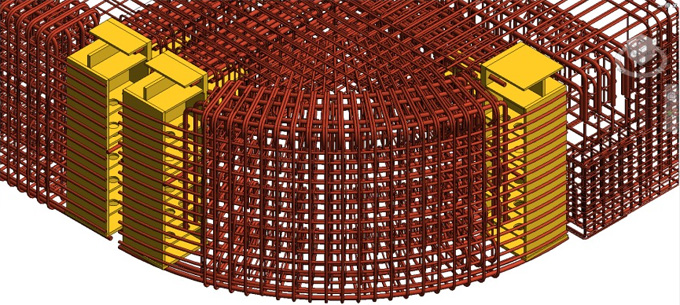
There is a library of menus in the CADS RC3D extension that drives detailing design tools for many structural elements, which are columns, beams and pile caps. There is also a reinforcement clash detection tool in the CADS RC3D extension. The user-friendly menu offered by the CADS RC3D extension includes the geometry and reinforcement type and diameter, which helps to fill in the details in the design model.
The CADS RC3D extension is free for users to use, but one-time registration is required. After downloading the application from the store, the user will receive an email with a registration number to activate the application. After that, the CADS RC3D extension will be fully functional for the ultimate users. In the case of installing this application in multiple systems, the users have to contact CADS through email.
Design features of the CADS RC3D for the Revit software
1. The CADS RC3D extension has customizable project settings that help to automate the production of details to the company standards.
2. The CADS RC3D extension has the ability to edit bar marks to suit the design project. This design feature helps to create its own bar mark logic by the host and drawing.
3. The CADS RC3D extension can schedule and weight reports that can be placed on the drawing sheets, exported to Excel by using the industry standard templates. These weight templates and schedules can be customised easily to the company standards with the help of the CADS RC3D extension.
4. The editing functions of the CADS RC3D extension allow the assemblies of reinforcement to be copied from one structure to another.
5. The group's edit option of the CADS RC3D extension helps to assign bars as staggered or alternate ranges; thus, this extension adds full annotation and labelling.
6. The CADS RC3D extension can split a bar or a group of bars automatically.
7. The CADS RC3D extension also has editing tools for a range of bars, thus range line or indicator bar can also be moved easily.
8. With the help of the CADS RC3D extension, reinforcement can be joined together, thus forming new bar shapes.
9. The CADS RC3D extension also helps to trim the reinforcement bars, and it can be extended to the edge of openings or concrete surfaces.
10. The path placement functions of the CADS RC3D extension allow the rebar to be placed parallel to other rebar in the construction structure.
11. With the help of the CADS RC3D extension, the reinforcement can be assigned to a structure, release and drawing sheet.
12. The CADS RC3D extension is also able to add revisions to sets of schedules, which helps to note changes in the drawing. In addition, the users are also able to keep a list of historical schedule documents.
13. The CADS RC3D extension is also able to freeze and unfreeze reinforcement, which helps to control the content of schedules for issued drawings.
Easy-to-use feature of the CADS RC3D extension
➢ With the help of the CADS RC3D extension, the users are able to copy rebar from host to host.
➢ The users are able to manage the Revit view visibility states to show the rebar by layer.
➢ With the help of the CADS RC3D extension, the user can identify those rebars which are not assigned to a drawing sheet, or rebar are below the specified minimum bar length or are above the maximum specified stock length.
To get online demonstration, watch the following video tutorial.
Video Source: The VDC Space
Download CADS RC3D
Time-saving feature
The CADS RC3D extension helps to save design time by automatically generating reinforcement in the Revit software by using the free unlimited trial option of the CADS RC3D extension.
CADS Markup
CADS Markup is a part of the CADS RC3D extension, which enables structural engineers to annotate a Revit design model along with the reinforcement information. This CADS Markup helps to convey the design intent to the reinforcement detailers. The design intent information has been contained within the Revit design model that can also be converted into reinforcement markup drawings. This CADS Markup tool can also be used to avoid the manual process of marking reinforcement regions on printed general arrangement drawings.
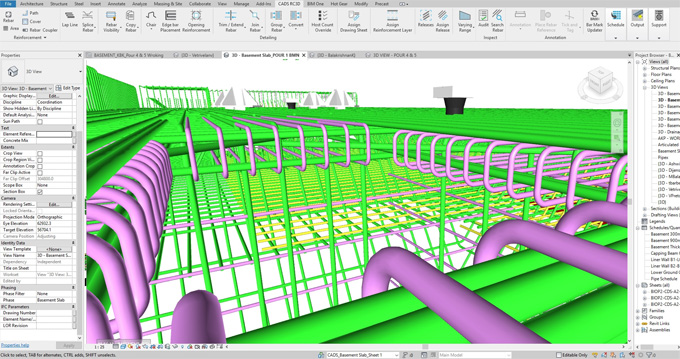
Gallery
Feel free to contact us for BIM requirements. One of our representative will respond you within 24 Hours. Send us your projects requirement today and grow your project.
Explore More !