What's New In PowerPack For Advance Steel 2026
The Autodesk Advance Steel 2026 software influences the collaboration among the detailers and engineers by improving the design coordination, clarifying the design intent and minimising the risks of design rework. With the help of the Autodesk Advance Steel 2026 software, users are able to achieve a seamless design workflow for design projects in the Building Information Modelling technology.
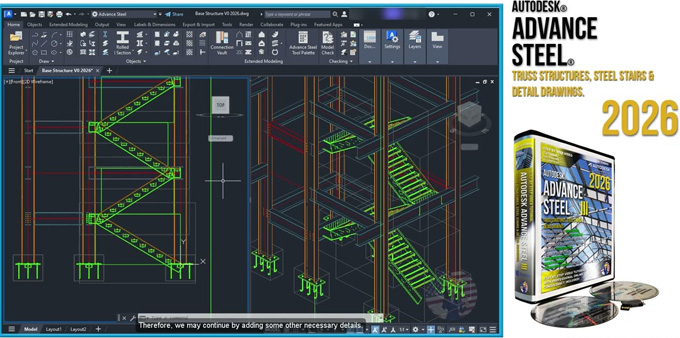
By using the Autodesk Advance Steel 2026 software, users are able to move from the design process to the fabrication process rapidly. In addition, the users can also streamline the steel fabrication and installation process by using the Autodesk Advance Steel 2026 software.
Discuss the system requirements for Autodesk Advance Steel 2026 software
To run the Autodesk Advance Steel 2026 software, 64-bit Microsoft Windows 11 and Windows 10 are required. It is recommended to have a 3+ GHz (base) or 4+ GHz (turbo) processor to run the Autodesk Advance Steel 2026 software. To run the Autodesk Advance Steel 2026 software, at least 8 GB of disk space is required, and 1 GB of disk space is also recommended for the disk cache. At least 8 GB of memory is required for the Autodesk Advance Steel 2026 software, and the display resolution should be a minimum of 1920 x 1080 (1080p). An internet connection is also required for the license registration of the Autodesk Advance Steel 2026 software.
Learn about the design features of the Autodesk Advance Steel 2026 software
Steel modelling feature
➢ With the parametric steel connection feature of the Autodesk Advance Steel 2026 software, users are able to model quickly and accurately, along with a customisable library of ready-to-use steel connections.
➢ The Autodesk Advance Steel 2026 software also allows users to discover and model non-structural building elements more accurately.
➢ The Autodesk Advance Steel 2026 software also allows users to create 3D folded elements of any sheet metal shape.
➢ The Autodesk Advance Steel 2026 software helps to reduce the tedious work and also helps to ensure the accurate placement of the steel connections, along with the automated connection propagation.
➢ The users can also use Dynamo’s visual programming language, which helps to create parametrically driven geometry for complex steel structures.
Detailing and documentation feature
➢ The Autodesk Advance Steel 2026 software also enables users to set the drawing styles and camera defaults, which allows them to document and clarify the design intent for the on-site construction process.
➢ The users are also able to generate detailed and annotated fabrication-ready drawing sets automatically with the help of the Autodesk Advance Steel 2026 software.
➢ The Autodesk Advance Steel 2026 software can also generate detailed fabrication datasets to drive the CNC workshop machines.
➢ The Autodesk Advance Steel 2026 software can also generate a bill of materials automatically from the modelled element data for use in the spreadsheets and reporting process.
➢ With the help of the Autodesk Advance Steel 2026 software, users are able to use revision clouds, which help to reduce the time spent tracking modifications to the shop drawings.
Interoperability feature
➢ The users are able to use AutoCAD Plant 3D and Advance Steel software together within the AEC collection, which allows the users to connect the design fabrication to the plant design.
➢ The users are also able to sync the design model updates between the Advance Steel software and Revit software, which helps to track the design changes.
➢ The Autodesk Advance Steel 2026 software also helps to transfer the structural analysis data between the Robot structural analysis process and the Advance Steel software, and this feature also helps to synchronise the design process and the detailing design workflows.
➢ The Autodesk Advance Steel 2026 software can export data via XML, KISS or IFC along with the MIS software.
➢ The Autodesk Advance Steel 2026 software can also import or export the 3D design model to an IFC 2x3 file.
➢ With the help of the Autodesk Advance Steel 2026 software, users are able to use the shared views for design collaboration. This feature also allows the users to show the progress of the project to the stakeholders.
➢ By viewing the Advance Steel drawings along with the object enabler, the data accessibility has been improved.
Process of downloading the Autodesk Advance Steel 2026 software
To download the Autodesk Advance Steel 2026 software, the user has to follow several steps, which are as follows:
1. At first, the user has to log in to the Autodesk Account Management page along with the user’s Autodesk credentials.
2. In the next step, the user has to click on the All Products and Services option from the navigation menu.
3. After that, the user has to locate the Advance Steel in their product list, and then they have to click on it.
4. The user has to click on the View Downloads button. After that, the users have to select 2026 under the version dropdown menu.
5. In the next step, the user has to select their preferred platform, language and also has to select the download method, for example, Install or Browser Download process. Then, the user has to click on the download button to complete the overall download process of the Autodesk Advance Steel 2026 software.
Gallery
Feel free to contact us for BIM requirements. One of our representative will respond you within 24 Hours. Send us your projects requirement today and grow your project.
Explore More !