How to download the Advance Steel Extension for Revit
The Advance steel extension is one of the leading-edge steel construction applications that has been specially designed for steel professionals. The Advance Steel extension helps to provide a simple, user-friendly design environment, which helps to create 3D structural design models.
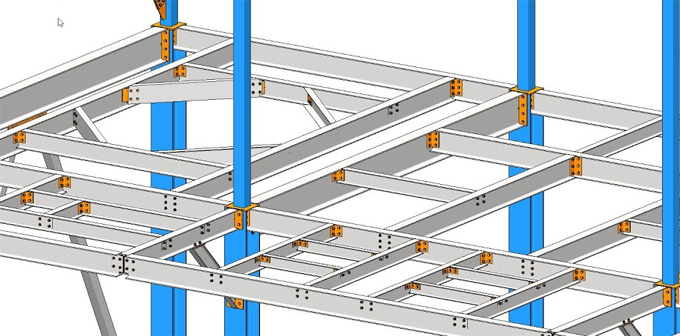
With the help of the Advance Steel extension, users are able to create a three-dimensional design model, and it has been stored in a DWG format. The Advance Steel extension helps to create complex structures along with all required features, for example, joints or connections within a command.
What are the system requirements for the Advance Steel Extension?
To run the Advance Steel extension for the Revit software, 64-bit Microsoft Windows 11 and Windows 10 operating systems are required. 32 GB of memory is required for the Advance Steel extension. The resolution up to 3840 x 2160 display card is recommended for the Advance Steel extension.
Learn about the design features of the Advance Steel Extension
Steel modelling features
Parametric steel connection features
The Advance steel extension helps to create a steel model more quickly and accurately, along with a customisable library of ready-to-use steel connections.
Sheet metal works
The Advance steel extension helps to create 3D folded design elements of any sheet metal shape within a very short time.
Offering dynamic extensions
The Advance steel extension uses the Dynamo’s visual programming language, which helps to create parametrically driven geometries for complex design structures.
Creating stairs and cage ladders
The Advance steel extension helps to discover and model non-structural building elements more quickly and efficiently.
Code-checking feature
The Advance steel extension enables the design professionals to check for design compliance, as well as validate the steel connections against the AISC standards.
Making steel connections
The Advance steel extension helps to reduce the tedious work and also helps to ensure the accurate placement of the steel connections, along with the automated connection propagation.
Detailing and documentation feature
Generating numerical control data
The Advance Steel extension can also generate the detailed fabrication datasets to direct and drive CNC workshop machines.
Creating steel shop drawings
The Advance Steel extension can automatically create the detailed and annotated fabrication-ready drawing sets.
Setting drawing styles
The Advance Steel extension enables users to set drawing styles and camera defaults, and can also use the general arrangement drawings to document the design intent for the onsite construction process.
Hiding or showing the detailed parts
The Advance Steel extension can also isolate the design parts and assemblies detailed for fabrication.
Providing drawing updates
The Advance Steel extension can also use revision clouds, which help to reduce the time spent tracking modifications to shop drawings.
Generating a bill of materials
The Advance Steel extension can also generate a bill of materials from the modelled element data for use in the spreadsheets and reporting.
Interoperability feature
3D interoperability feature
With the help of the Advance Steel extension, users are able to use AutoCAD Plant 3D and Advance Steel in the AEC collection, which helps to sync fabrication and plant design.
Robot structural analysis interoperability feature
The Advance Steel extension helps to transfer the structural analysis data between the Advance Steel and Robot Structural Analysis and helps to connect design, analysis and design workflows.
MIS software interoperability feature
The Advance Steel extension helps to export data via KISS, XML or IFC along with the MIS software.
Autodesk Docs interoperability feature
The Advance Steel extension uses the compare tool in the Autodesk Docs, which helps to track progress and assess the impact of the changes on the design.
To get online demonstration, watch the following video tutorial.
Video Source: Lawrence Hooker
Custom setting import feature
The Advance Steel extension helps to import the custom settings when moving to new versions of Advance Steel, thus helping to save the overall design time of the users.
Download Advance Steel Extension for Revit
Discuss the process of downloading the Advance Steel Extension for the Revit software
To download the Advance Steel extension for the Revit software, the user has to follow several steps, which are as follows:
1. At first, the user has to click on the Exchange Apps button in the Revit software.
2. In the Exchange App store, the user has to search for the Advance Steel extension. This is the free add-in for the Autodesk subscription customers.
3. In the next step, the user has to download and install this add-in. In this context, the user has to close Autodesk Revit before installing this extension.
4. After installing the Advance Steel extension, it will be listed in the add-in tab within the Revit software.
5. After completing the installation process of the Advance Steel extension, the user is able to export the Revit structure model to be imported into the Advance Steel extension.
Gallery
Feel free to contact us for BIM requirements. One of our representative will respond you within 24 Hours. Send us your projects requirement today and grow your project.
Explore More !