How to Render in Revit: A Complete Step-by-Step Guide
3D rendering in Revit software helps to generate an image from the design model by means of computer software. The 3D rendering in Revit has been used in video games, architecture, simulators, films and television visual effects and also in the design visualisation process.
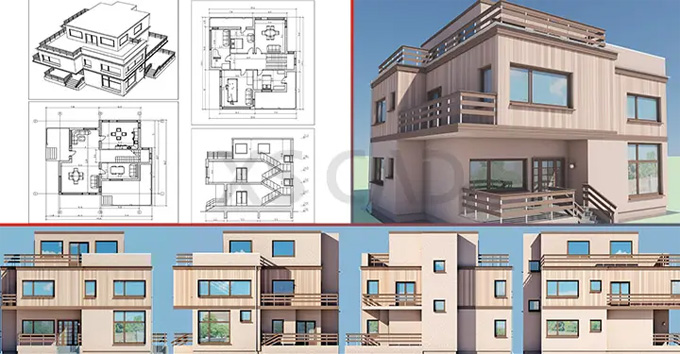
The 3D rendering process is the last step of the animation process, which helps to give the final appearance to the design models and animation, along with the visual effects, for example, texture-mapping, shadows, shading, reflections and motion blurs.
Discuss different types of 3D rendering in Revit
Software rendering
Software rendering helps to produce images of the highest quality, which allows users to achieve the most sophisticated design outcomes.
Hardware rendering
The hardware rendering helps to use the computer’s video card to render the images to disks. The hardware rendering process is faster than the software rendering process, though it produces lower-quality images as compared to the software rendering.
Vector rendering
The vector rendering process enables the users to cerate stylized renderings, for example, tonal art, cartoon, line art, wireframe and others. These images have been formed in various bitmap image formats and also in 2D vector formats.
Cloud rendering
The cloud rendering helps to create photorealistic and high-resolution images within a fraction of the time that has been required on the desktop.
Learn about the different 3D rendering and visualisation software
There are several 3D rendering and visualisation software for Revit, which are as follows:
Enscape
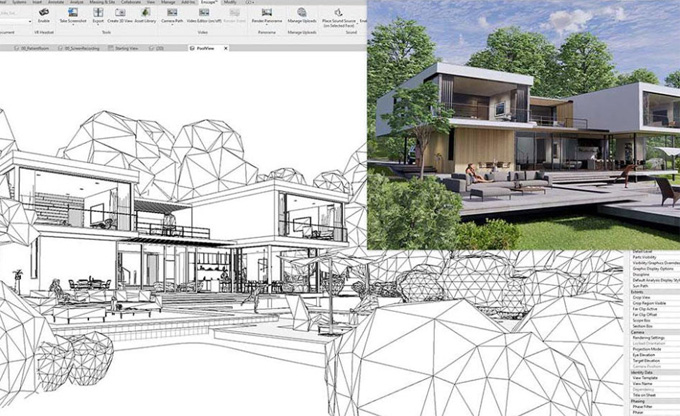
Enscape is the most useful 3D rendering software in Revit, which has been widely used by designers and architects. Enscape software helps to provide real-time visualisations without a steep learning curve. This 3D rendering tool can work directly within the Revit software, that indicate the users do not need to export the design models or jump between the platforms.
Features
1. Enscape helps to provide real-time feedback inside the Revit software, and no exporting is required.
2. The Enscape tool is easy to learn because of its minimal user interface and intuitive controls.
3. The Enscape software offers fast rendering along with a decent realism feature, which is great for client-facing work.
Lumion
This 3D rendering software helps to provide high-quality visuals without spending lots of time. This 3D rendering tool helps to connect with Revit software via LiveSync, which enables users to sync their design model and render in real-time. This 3D rendering and visualisation tool is great for vibrant and emotional renders, which go beyond strict realism. The Lumion in Revit has been widely used in architecture firms for client-facing visuals.
Features
1. The Lumion tool has the LiveSync integration feature, which helps to keep the Revit design model connected.
2. The Lumion tool also has a fast rendering feature, which provide strong visual impact.
3. The Lumion tool has a huge asset and material library.
4. With the help of the Lumion 3D rendering tool, users are able to create panoramas, videos, and images more easily.
Twinmotion
For those designers who want quick and interactive visuals with minimal setup, the Twinmotion software is appropriate. This 3D rendering tool is backed by Unreal Engine, which indicates the capability of handling immersive presentations like VR experiences and walkthroughs.
Features
1. Twinmotion 3D rendering tool helps to support walkthroughs, virtual reality and interactive presentations.
2. The free version of the Twinmotion 3D rendering tool is available to users. For commercial use, the Twinmotion 3D rendering tool has come with a pro tier version.
3. The Twinmotion 3D rendering tool has a huge asset library, which includes animated people and vehicles.
To get online demonstration, watch the following video tutorial.
Video Source: Balkan Architect
V-Ray for Revit
This 3D rendering and visualisation tool has the ability to produce photorealistic design outputs. This 3D rendering tool can integrate directly into the Revit software, but in this case, the user should be prepared for a bit of a learning curve. The controls of the V-Ray software are more technical than those of the other tools, and the setup of this 3D rendering tool takes longer, but the design outputs are in a different league.
Features
1. V-Ray tool for Revit offers top-tier photorealism, which is specialised for lighting and materials.
2. The V-Ray tool also has highly customisable render settings and camera controls.
3. The V-Ray tool is ideal for achieving post-production and presentation-quality visuals.
Autodesk Cloud Rendering
This 3D rendering software requires no setup and helps to use cloud processing to render the views of the users. The Autodesk Cloud Rendering software is perfect for internal design reviews and construction documentation.
Features
1. This 3D rendering tool jas built into the Revit software, and no extra software is required for this tool.
2. The Autodesk Cloud Rendering tool is cloud-based; as a result, the computer can stay free.
3. The Autodesk Cloud Rendering tool is simple to use and also good for basic renders and 3D views.
Gallery
Feel free to contact us for BIM requirements. One of our representative will respond you within 24 Hours. Send us your projects requirement today and grow your project.
Explore More !